Philadelphia Magician Shares System for Theatrical Sound Cueing
Skipping Sound Effects at First
Undermine Realism: Imagine that the thought of an audience member is revealed, and suddenly, audio speakers play the sound of an explosion. That sound effect makes it seem like everything was planned out in advance. It can therefore take away from the realism and organic feel.
Risk: Sound effects (very quick sounds) are also less forgiving. If a sound effect is cued 1 second late, it may sound terribly out of place. Mentalists/magicians who are self-cueing, are already managing participant selection, welcoming audience members to the stage, talking, listening, etc.
Long Audio Tracks VS Sound FX: Long audio tracks (like instrumentals and songs) fill multiple times more space in a show. Generally, they move the needle a lot more than quick snippets of sound - because they can easily fill 30, 60, or 100 times as much time in a show.
This system focuses on leveraging long audio tracks first, to move the needle fast.
Long Audio Tracks
Mentalism and Magic Are Impromptu
Mentalism and magic shows are partly impromptu. We may have scripts, but we also talk with audience members, and we can not reliably predict how long these conversations will be. We can not plan all of the exact durations that sound tracks need to play for.
Loopable Audio Tracks
Magicians/mentalists need a flexible system for sound that still works for moments that vary in duration. The most common way to accommodate the unpredictable length of a moment is to make an audio track loopable. This means that the beginning of the audio track and end of the audio track match in a way that they don’t abruptly skip, or sound jumpy, when the audio track starts over.
Reusable Audio Tracks
If a short audio track is loopable and gets cued many times, it may be redundant. But if an audio track is extremely long, it can be paused and played many times without redundancy. This is because different parts of an individual audio track will be played each time it is cued. (It won't be an advantage in this article's system, but it otherwise often is.)
Sound During the Show VS Before/After the Show
Consider a Hollywood movie. At the beginning, there is a beginning with credits. Music is playing. This music can help set the mood. At the end, the credits play again and there is music.
If the movie is bad after the intro, the movie is still bad. No amount of good music before the movie starts will change that. If the music after a bad movie is good, that won’t do anything to save the movie.
The point is, we can play sound before and after a mentalism show—this is called “house” music in theatre—and I think it’s a really cool concept, but it’s not what moves the needle. What matters the most, by leaps and bounds, is sound during the show. This system only focuses on sound during the show.
Underscores
There’s a common sticking point I’ve seen magicians hit when they add music to a show—and I made the same mistake.
I did what most people do: I listened to songs, picked my favorite, and played it while I talked onstage. It drove me crazy because the music fought my voice. It clashed, pulled focus, and felt like it was competing with what I was saying.
Theatre training fixed this for me.
Here’s the key: music that works under speech can sound underwhelming on its own. It can feel like it’s missing energy—because it is missing something: the voice. A track designed to support something else onstage—like a voice, a moment, or an action—is called an underscore. Underscore often isn’t exciting out of context, so we dismiss it and choose a richer, fuller song instead. But that kind of track is already busy, and once you talk over it, everything gets crowded.
In other words: if the music is “complete” by itself, it usually won’t leave room for your words. A sound track that complements talking is usually called a “dialogue” underscore in theatre, even when it’s one person speaking. Here is an example of an underscore for dialogue.
UNDERSCORE (DIALOGUE): 30-SECOND EXAMPLE
UNDERSCORE (STAGE BUSINESS): 30-SECOND EXAMPLE
There’s another underscore that complements actions when talk is not the main focus. These actions are usually called “stage business” in theatre. For example, when an audience member is walking up to the stage, this action is more of a focus than talk - and it is considered “stage business.” Below is an example of an underscore for stage business.
UNDERSCORE (TENSION): 30-SECOND EXAMPLE
Another underscore is used for moments of tension and it is called “tension” in theatre. In a mentalism show, this can be a period of anticipation as a routine closes in on a final reveal/moment. Below is an example of an underscore for tension.
SILENCE
The 3 underscores above can alternate with moments of silence. Sometimes silence can be powerful. Think about if a loud party had music that abruptly stopped. This can bring power to a moment.
Where to Find Free-of-Charge, Royalty-Free Audio Tracks: Pixabay
Pixabay: https://pixabay.com
Free-of-charage, royalty-free audio tracks (but always check the license terms to be on the safe side). No sign-up required to download. Thousands upon thousands of audio tracks.
Authenticity (Legend of Zelda as example)
Everyone has their own personality, stage character, temperament, background, and story. If you choose music that you enjoy or feel fits you, some people would argue that the authentic match will be felt by the audience.
For me, the video game Legend of Zelda felt magical when I was fully immersed in it. It follows a plot with adventures, mystical moments, spells, and other supernatural occurrences - and the music emotionally complements everything. The feeling of magic it creates has forever inspired me.
In the sound examples I embedded above, they all have something in common. All of the audio tracks in my show are not Legend of Zelda tracks, but they sound similar enough to Legend of Zelda’s sound - that they could feasibly be used as audio tracks in a Legend of Zelda game.

You can describe your personal style and preferences in an AI prompt used to search for sound tracks.
AI Prompt Template to Find Sound Tracks for You
I am a freelance magician/mentalist. My stage character is [describe stage character/personality in detail here]. The type of music and sound I like is [describe something about music you like here]. I need only 3 total audio tracks for my live stage show. I need an underscore for stage business, an underscore for dialogue, and an underscore for tension. I need you to use Pixabay to find a list of underscore tracks to choose from for stage business, a list of underscore tracks to choose from for dialogue, and a list of underscore tracks to choose from for tension. Audio tracks that last at least 3 minutes are preferred. I need you to only send me links to web pages on Pixabay to download individual audio tracks. I don’t mean directly download links, but a web page on Pixabay that is dedicated to 1 audio track instead of a search results page on Pixabay. You *MUST* include a clickable hyperlink for the web page of each individual audio track you list. You can send the names of the song, but do not send me anything else. I only need you to generate the 3 lists.
Match the Volume of the 3 Tracks
If the volume of 1 track is absurdly louder than another track, it won’t be good. If you don’t know what sound editing software to use, “ocenaudio” is free and can be downloaded here: https://www.ocenaudio.com/en/startpage

AI Auditing (Only a First Step)
If you want to check more closely to confirm that the audio tracks are your intended type of underscore, trim each sound track down to a 30-second segment. Then upload each track as an attachment to AI, one by one, with these prompts:
Prompt to audit underscore for dialogue
Do not give me extra information. Keep your response limited to a simple yes-or-no answer. Does the attached audio file work as an underscore for dialogue?
Prompt to audit underscore for stage business
Do not give me extra information. Keep your response limited to a simple yes-or-no answer. Does the attached audio file work as an underscore for stage business?
Prompt to audit underscore for tension
Do not give me extra information. Keep your response limited to a simple yes-or-no answer. Does the attached audio file work as an underscore for tension?
The AI prompts do not guarantee a match, but the AI serves as a first audit before auditing it as a human.
Human Auditing
Play sound tracks while watching a video recording of your magic/mentalism show.
Hardware to Cue Sound
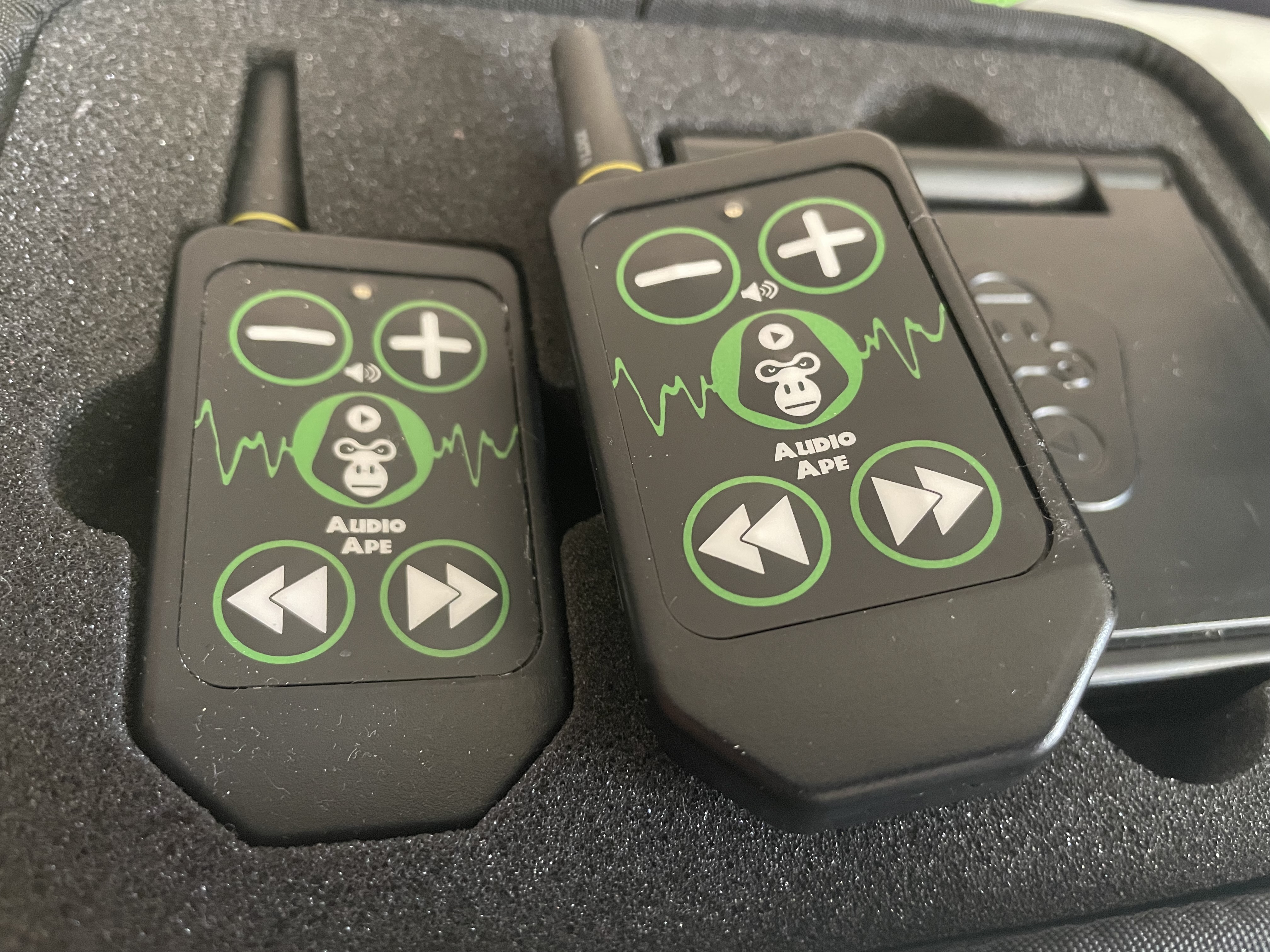
- Audio Ape Pro
- Audio Ape Pro remote
- iPad
Software to Cue Sound: Go Button
- In Theatre, QLab is the industry standard software for cueing sound. However, QLab is for desktop computers and laptop computers, not iPads.
- Go Button is developed by the same company as QLab. It works on an iPad to keep hardware lightweight, small, and fast to set up.
Crossfades as Transitions
A crossfade means that as one sound track's fade-out occurs, another sound track's fade in plays at the same time. A crossfade is generally a smoother and more professional transition than when the fade-in and fade-out do not overlap.
Create the Crossfades
Setting up the crossfades is done in Go Button. To set up crossfades, you have to changes settings within each sound track. Here's how to do it:
Confirm you have a "show" in Go Button. If not create a show. The show is a container that audio tracks live in.
- Add the underscores inside of the show.
- Go into Edit mode.
- Select a track.
- Tap the pecil icon.
- Scroll down to "WHEN THIS CUE STARTS" -> "Stop Others"
- Tap "CUES ONLY" to toggle it on.
- Tap the timestamp next to "With Fade Out Time" and set it to 5 seconds. (You can adjust this it later if you don't like how it sounds at 5 seconds.)
- Tap the timestamp next to "Fade In Time" and set it to 5 seconds.
- Save your changes.
- Repeat the process to set up cross fades for the other (underscore) sound tracks.
Go back into the regular (non-Edit) mode and see how the crossfades sounds. If you feel they're too long or too short, go back to the settings you just edited and change the timestamps.
Make the Underscores Loopable
- Go into Edit mode.
- Select a track.
- Tap the pecil icon.
- Go to Loop -> On (with an infinity icon). Tap it to toggle it on.
- Save your changes.
- Repeat the process to set up cross fades for the other (underscore) sound tracks.
Pre-Program 1 Remote Button Per Underscore
Instead of pre-planning every sound in a rigid order and structure, you can pre-program 1 button per (loopable) underscore sound track.
For each individual audio track, go into the Cue settings. Open "Trigger" and assign the desired remote button as a trigger.
More Options
This system is just a basic system that borrows from Theatre practices, and has an advantage for keeping equipment to a minimum. However, there is plenty of room to scale and explore other possibilities.
- Two Audio Ape Pro remotes can be used instead of one remote, which offers more audio files to cue.
- An Apple laptop with QLabs installed can be brought to events. It can paired with a iPad that has QLabs Remote installed. The iPad can be left on a magician's performance table and operated only when at the table. This is much closer to that hardware and software that a theater's sound operator would be using.
- A human can be hired to travel to events and operate sound.
Further Reading (Theatre Sound Design)
- Sound and Music for the Theatre: The Art and Technique of Design by Deena Kaye and James LeBrecht
- The Art of Theatrical Sound Design: A Practical Guide by Victoria Deiorio
- Sound Design for the Stage by Gareth Fry
- User manual for Audio Ape
Need to Hire a Magician in Philadelphia Who Uses Theatrical Sound Cueing?
This article explains a simple way to add theatrical sound design to a magic show using pre-recorded soundtracks. If you’re a magician who is unavailable for an event and need to hire a magician in Philadelphia who can use this sound cueing system, click here to check availability.